
New update available
Release Notes for Version 6.3
published on March 19, 2026
Investigation Reports
The Reports section is available in the report file: a text editor with a side-by-side preview. Support for placeholders (individuals and report blocks) and predefined templates that can be configured from the admin area. Reports can be saved, viewed, edited, and exported to PDF or Word. Additional information is available in the user manual.
Investigation Template
Investigation template area available in the report file and in dossiers. Investigation templates are structured questionnaires useful for performing standardized checks on reports (e.g., eligibility, closure, or remediation). They can be created using templates that can be configured independently in the admin area. Further information is available in the user manual.
Allowed Operations on Closed Reports
In the “closed” status, certain previously restricted operations have been enabled: sending messages from the manager to the reporter (with the option to reply only to the last message), sending internal messages, and managing reminders (e.g., locking/unlocking even after closure).
Customizable report list
Dynamic column configuration has been implemented in the report list: the user can select and sort fields (including any Classification fields and Tags) with saved preferences. Display optimization with column prioritization, automatic hiding, and expanded details.
User Roles for Each Organization
In the admin section, a new card has been added to the user profile for managing roles: a user can have different roles for each organization. A primary role has also been defined, which is used when no specific role is specified for an organization or in contexts without a unique organization (e.g., dossiers). The “role” is a simple informational label and does not define permissions within the software; these are instead determined by the user’s assigned team.
Filtered Exports
The ability to export filtered data from the report lists and statistics (overview and general) has been introduced. The export can reflect the current view (with filters and search applied) or allow the choice between exporting the current view or all data.
- Filters in select-type report lists are all multi-select
- Change to the number of reports displayed in all three tabs (open, closed, delete
The update will be performed during the evening hours so as not to slow down the system during business hours.
You will be able to take advantage of the updates based on the modules activated on your installation.
For further information, please contact us via the “Request Support” link.
New update available
The new version 6.1 of the Legality Whistleblowing – Reporting Misconduct platform will be released soon
published on October 15, 2025
Customizable Dashboard
Each user can now resize, move, or hide widgets in their personal dashboard.
Changes are saved at a personal level and do not affect other users.
Highlights
A new button (⭐) has been introduced to mark reports, dossiers, and whistleblower messages as “highlighted.”
Items marked as favorites are now displayed in a dedicated “Highlights” section of the user dashboard, with direct links to the marked content.
Bulk Assignment
It is now possible to assign multiple reports simultaneously to a single user of the working group.
The feature is available in the lists of Open and Closed reports, via the icon ⋮ located on the right side of the list.
Statistics Section
The statistics section has been improved and enriched with new charts.
Notification of Report Closure to the Working Group
When closing a report, it is now possible to send a notification email to the users of the working group.
A new “Email Notification Recipients” field has been added above the “Closure Note.”
Whistleblower Name after Submission
In anonymous reports, the whistleblower can now enter their name and email address even after submitting the report, which will then become nominative.
Accessibility
The whistleblower interface has been further improved in compliance with the WCAG 2.2 accessibility guidelines.
The update will be carried out during evening hours to avoid any slowdown of the system during working hours.
The new features will be available according to the modules activated in your installation.
For more information, please contact us through the “Request Assistance” link.
New update available
Version 6 – Update Release Notice
published on July 17, 2025
Header
Header reorganized for clearer readability.
Overview
Added “Overview” section in the report dossier:
- Groups all key information in a single view, replacing the expandable cards.
- Includes: Report details, Reminders, Workgroup, Links, Additional classifications.
Report Title
- It is now possible to edit the report title in the header without altering the original subject provided by the whistleblower.
- Useful for sharing the report, allowing anonymization of this information if necessary.

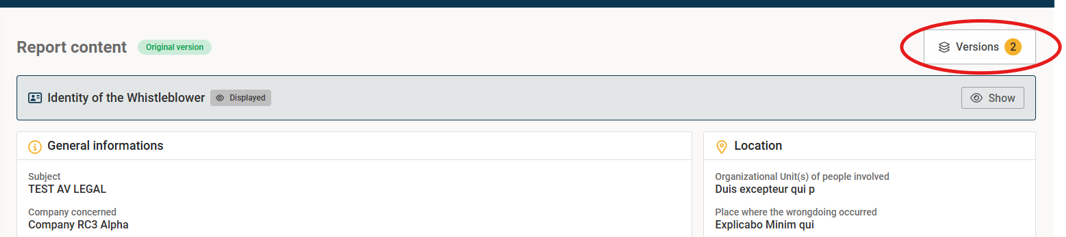
Anonymized Version
- Introduced the possibility to create anonymized versions of the report for sharing with other users.
- Discover the feature by consulting the user manual.
Report Sharing
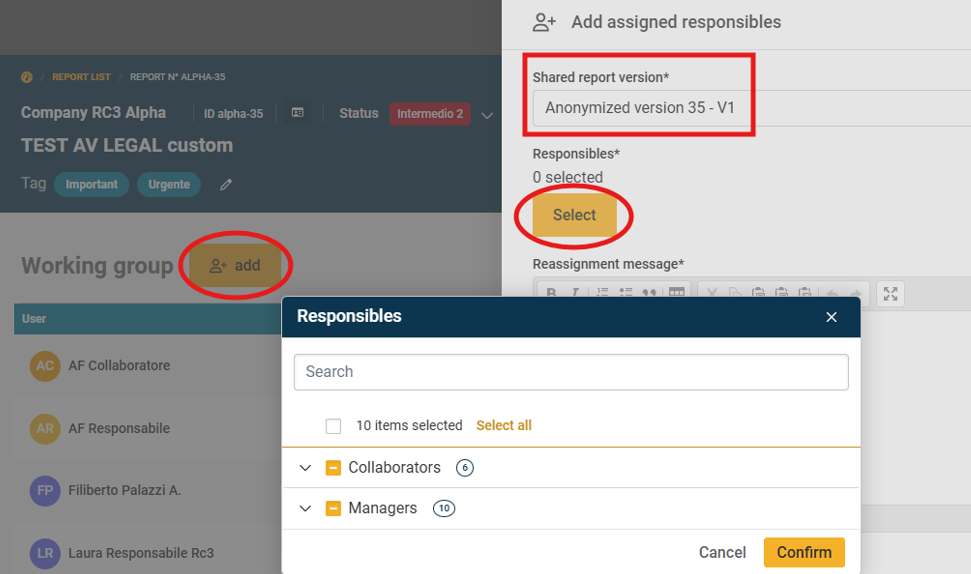
- Sharing reports with other users has been adapted to the new Anonymized Versions functionality.
- Now sharing, including with “collaborators”, happens directly in the “Report Content” section instead of via internal messages.
- The user with whom an anonymized version is shared sees only the anonymized version in the “Report Content” section.
- Note for existing reports: collaborators will continue to view them in the message area as before.
- For details, consult the user manual
Dossier
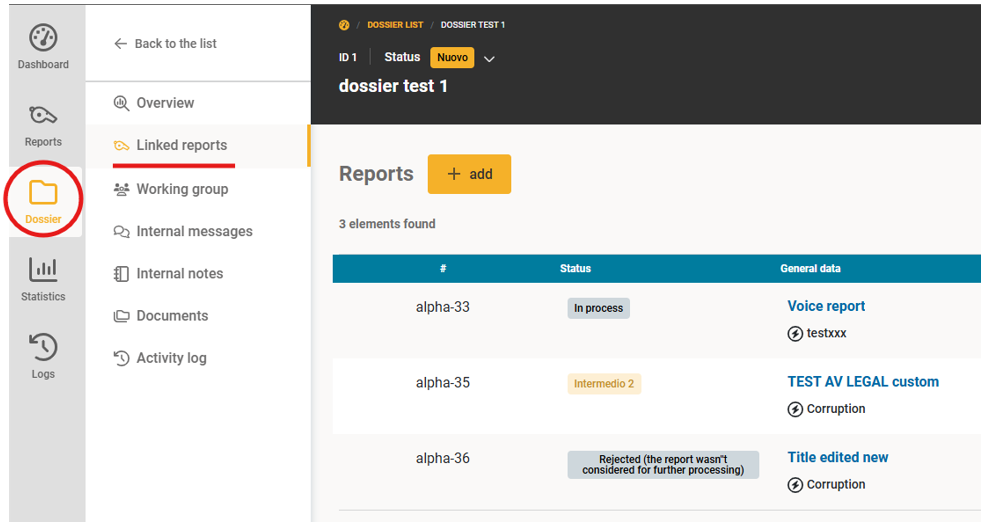
- Upon request, it is possible to activate the “Dossier” section.
- The dossier has the same functionalities as a report dossier (sharing with other users, message area, notes, etc.) and is designed to group multiple reports into a single view.
- To request activation, contact us.
Messages with Whistleblower
- Added read receipt indication (✔✔ double checkmark).
Notification Management
- You can now choose which notifications to receive in the profile settings (Preferences – Notification Management section).
List Filters
- Applied filters are saved during the session.
- Filters are reset at the end of the session (logout).
Admin Area
New configurations available for admin users, including:
- Modifying team permissions (Managers and Collaborators).
- Creating new workflows to apply to reports.
It is recommended to read the user manual before making any changes. A dedicated training session for administrators can also be requested.
Manual Link
The manual link has been moved to the user management button in the top-right corner.